Verified assets, evidence-led collateral assessment: the lender portal demo.
Development demonstrator · Fictional example data · Not a live lending service
Roadmap · subject to approvals In development · sandbox · screenshots only
See how Property Vault is designed to help lenders assess assets through a structured, owner-authorised record of ownership and title evidence, valuations, insurance, existing charges and liens, and provenance. Review your own criteria, trace each assessment outcome to the evidence behind it, and check the integrity of a Collateral Report.
One verified asset record. A clearer route to collateral assessment.
One structured record
Ownership and title evidence, valuations, insurance, existing charges and liens, custody and provenance, each in its own section of one Collateral Report. A section with nothing held says "None on record" rather than leaving a gap.
Your criteria, as written
The evidence is compared with the criteria your organisation publishes per asset class. Property Vault sets none of its own. Each assessment records the criteria version and its fingerprint.
Traceable outcomes
Every criterion reads met, not met or not known, with the detail and the evidence record it rests on, and the report states whether that evidence came from the owner or from a professional.
Owner-controlled access
The owner authorises access for one purpose and until a date, and can revoke it. A report is valid until the grant ends at the latest, and its seal can be checked by anyone holding its reference.
These describe what the product is designed to do, as shown in the screens below. They are not measured results: any effect on time or cost would need to be shown in lender trials.
The Collateral Report a lender receives.
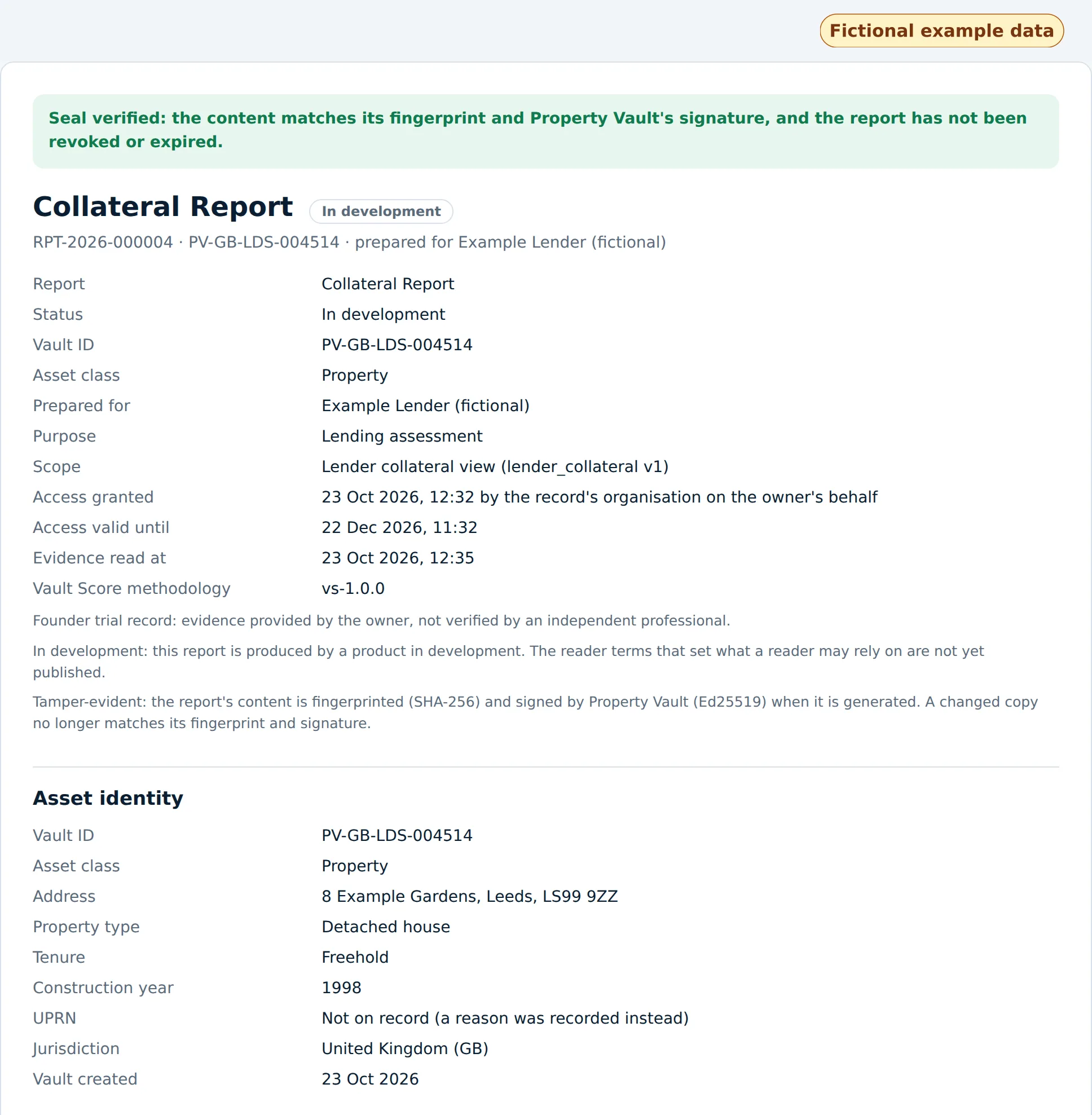
Collateral Report RPT-2026-000004, generated for "Example Lender (fictional)" on a fictional detached house at 8 Example Gardens, Leeds. The steps before and after it are further down.
Two results, two different questions
Report integrity: genuine and valid
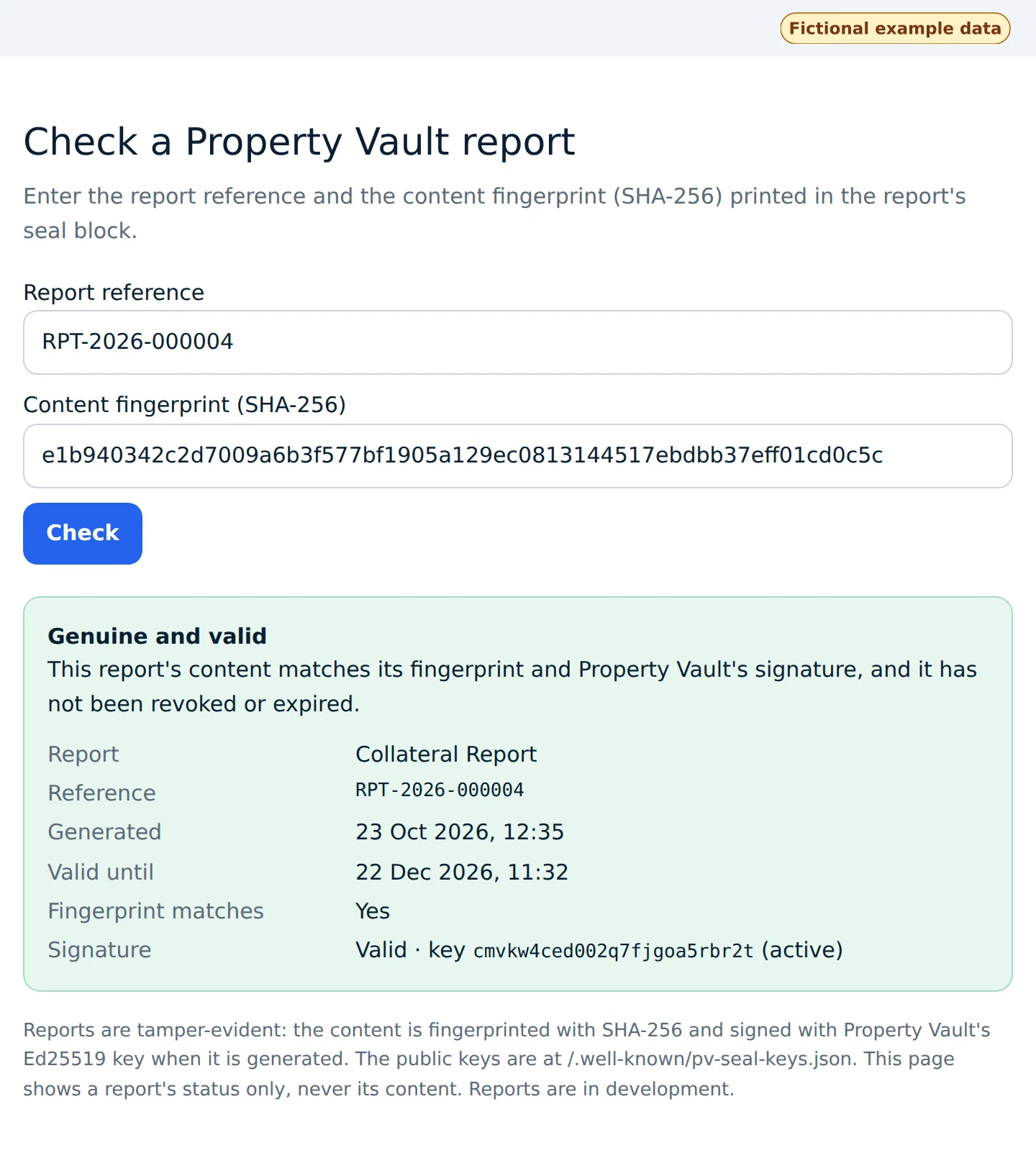
Is this the report Property Vault generated? Its content matches its SHA-256 fingerprint and Property Vault's Ed25519 signature, and it is neither revoked nor past its valid-until date.
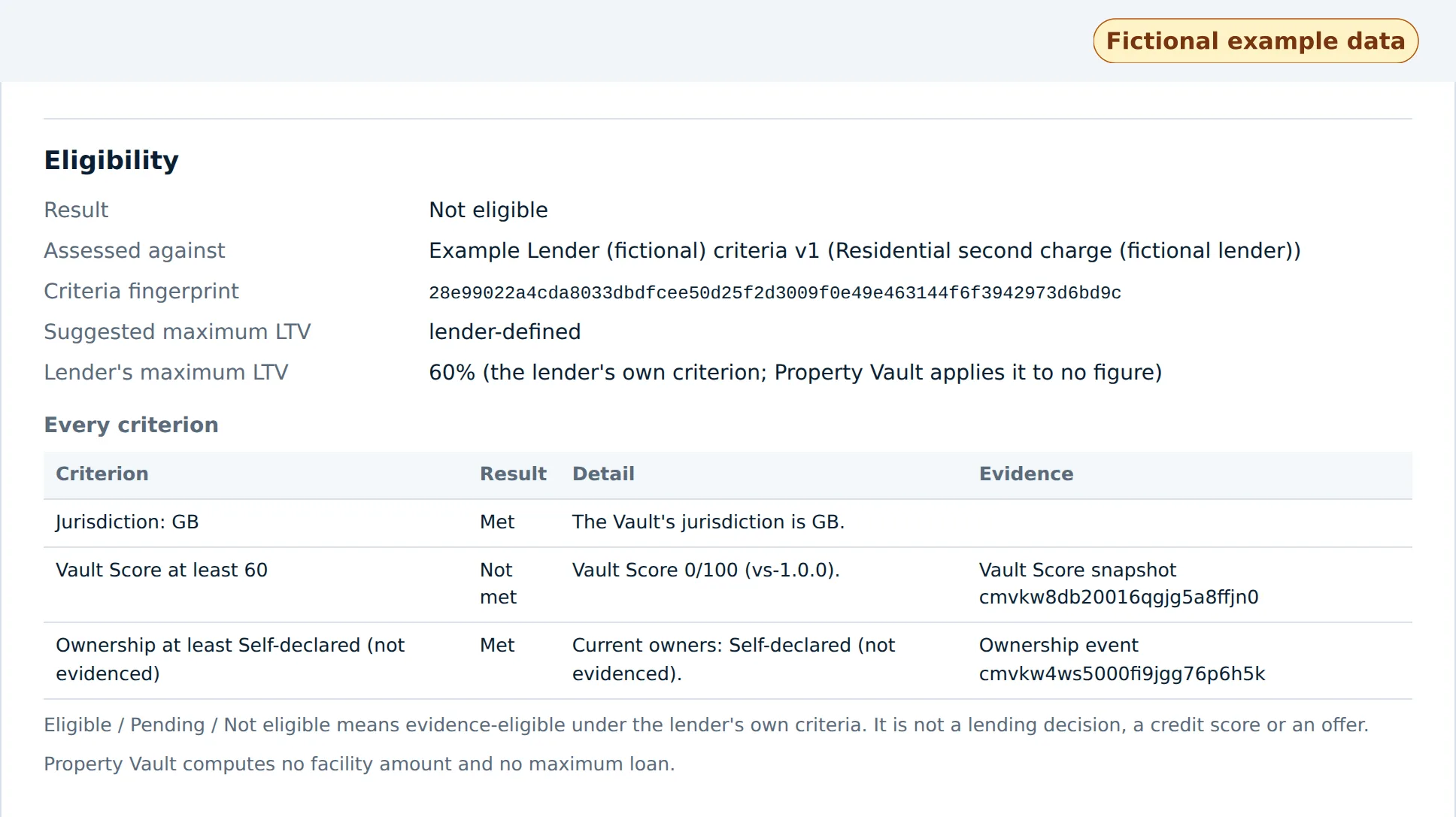
Lending assessment: not eligible under this example lender's criteria
Does the evidence on record meet this lender's published criteria? Here, no: the Vault Score of 0 is below the fictional lender's minimum of 60.
A report can be genuine and valid while the asset it describes is not eligible. "Valid" says the report is authentic and current; it never means approved for lending. Neither result is a lending decision: the lender decides.
Sample report (fictional example data)
The finished PDF of Collateral Report RPT-2026-000004, as Property Vault's report renderer produced it on the development copy from the sealed report content: five A4 pages, about 12 KB. Every name, address, asset and lender in it is fictional.
- Valuation, insurance and charges read "None on record" because the example Vault holds none. The report states that rather than leaving the section out.
- The "Check it" link printed in the seal block points at Property Vault's public report check. This example exists only in the development copy, so that page will not find it.
The lender portal demo, step by step.
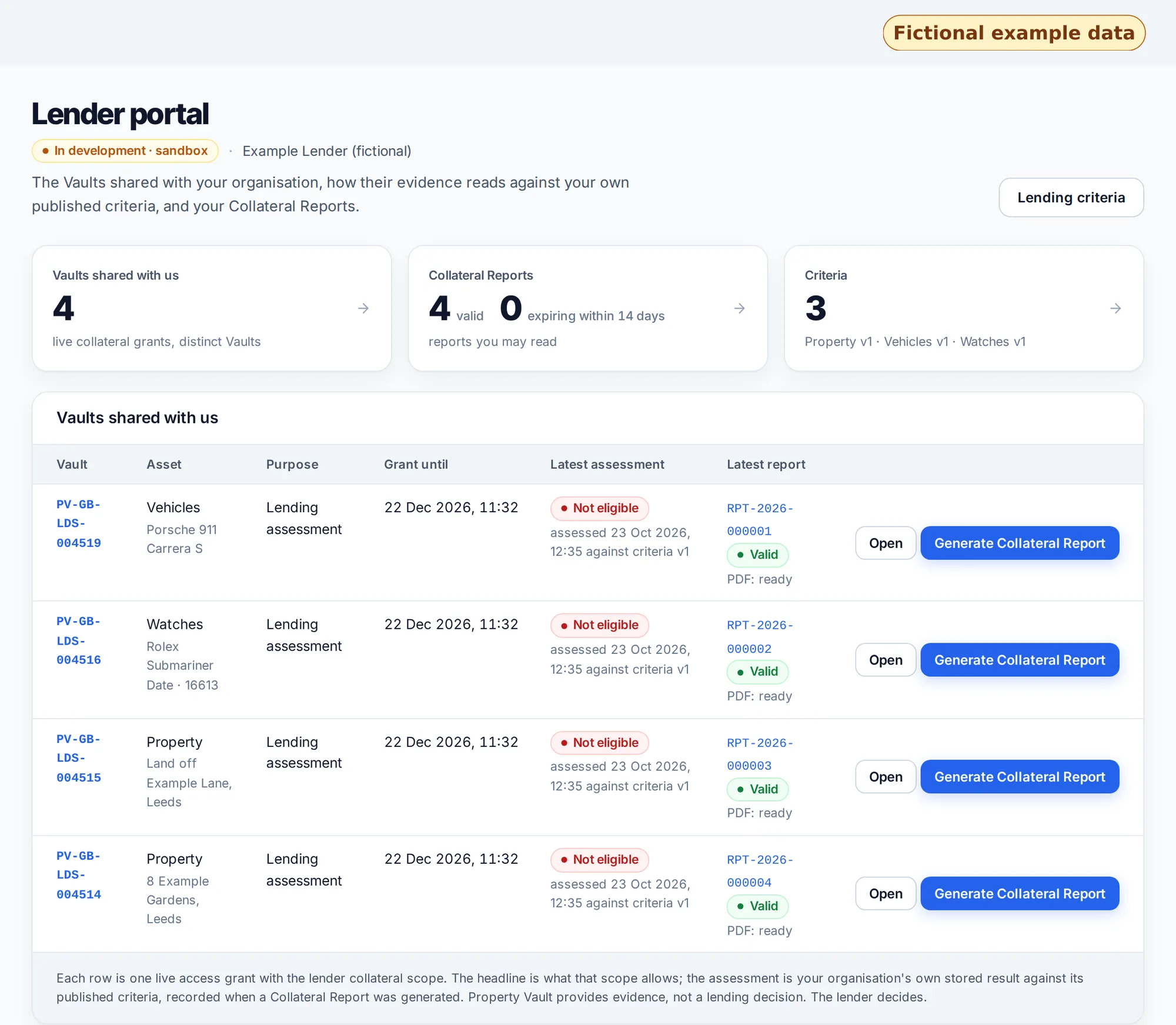
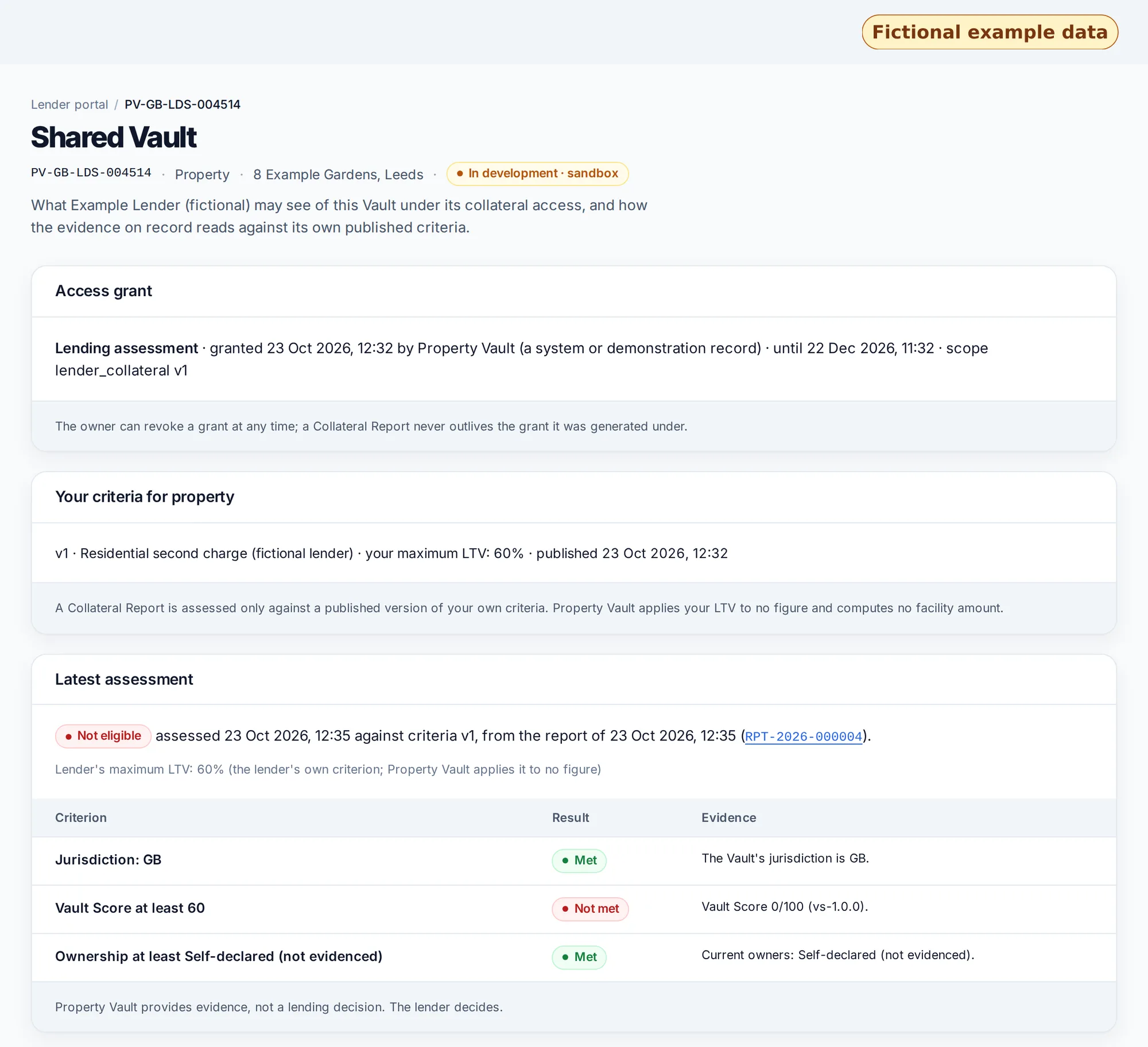
An owner shares a Vault with a lender for a lending assessment. The lender sees it in the portal, reads the evidence against its own published criteria, generates a sealed Collateral Report, and anyone holding the report can check its seal. Select any screenshot to open it full size.
Shared with you
Each row is a current access grant from an owner, for one purpose and until a date. The owner can revoke it at any time.
Your criteria
The lender writes and publishes its own criteria per asset class. Property Vault applies them; it sets none of its own.
Collateral Report
One report, sealed (SHA-256 and Ed25519), with each section of evidence and its source.
Eligibility
Each criterion shown as met or not met beside the evidence on record.
Check the seal
A public page confirms a report is genuine, unaltered and not revoked or expired, without showing its content.
Steps 3 and 4, the Collateral Report and its eligibility section, are shown above, with the sample PDF.
What is real in this demo
The screens, the criteria engine, the access grants, the sealing and signing of the report, the PDF renderer that produced the sample report and the public seal check: the code that produced them is the code in development today. The Vault Score shown is the score the published methodology gives these records.
What is fictional or not yet available
The lender, the owner, the assets, the addresses and the criteria are fictional example data. The lender portal and the Collateral Report are in development and switched off in production; there is no lender sign-up and no access from this page. The lender-valuer scope is launching.
More on how the report is meant to be used: collateral verification for lenders, Lending & Collateral, Property Vault Pro and, for the ledger side, the XRPL testnet demonstration. How sealing works is in tamper-evident documents and security. What is available today, feature by feature, is on the status page.
Property Vault provides evidence, not a lending decision. The lender decides. Lending & Collateral is on the roadmap, through regulated partners, subject to regulatory approvals. This page describes a product in development. It is not an offer or a financial promotion.
Lender enquiries
See it walked through on fictional data, with criteria like yours. On the booking form, choose "Bank or lender" as your role and "Lender-valuer scope and Collateral Report" as the workflow, and tick the asset classes you lend against. Or register interest as a lender, or email hello@propertyvault.world.